


In this article 9 sections
For a small business that wants email on its own domain, paying for a complete office suite may be unnecessary. telaMail offers a low listed starting charge: the UK catalogue reviewed on 30 October 2026 lists telaMail 1 at £0.80/month with a business-email allowance of ten and 5GB storage.
That is a concrete budget advantage for a simple-mail requirement. The right decision still depends on mailbox capacity, client compatibility and whether the team needs shared documents, meetings or more advanced administration.
Where the entry charge is lower
| Published item | telaMail 1 | Microsoft 365 Business Basic, no Teams |
|---|---|---|
| Monthly subscription charge | £0.80/month | £5.04/user/month |
| Annual option | £9.60/year | £4.20/user/month, paid yearly |
| Published scope | Business-email allowance of 10; 5GB storage | Business email and a wider productivity suite |
| Buying unit | The listed mail plan | A licensed user |
telaMail has the lower listed entry charge in this pairing. Microsoft states that its prices exclude VAT; telaHosting's public catalogue does not state its VAT basis, so this table does not equate tax-inclusive invoice totals. Ten email addresses must not be treated as ten equivalent Microsoft user licences.
Microsoft's bundle includes web and mobile productivity applications and cloud services. A team needing those functions is choosing more than a mailbox. The useful telaMail advantage is the small starting mail budget when that wider suite is not required.
Six real email options and their different purposes
1. telaMail for a modest standalone mail budget
telaMail 1 lists webmail, IMAP, POP3 and SMTP, along with spam and virus protection, forwarders, autoresponders and SPF/DKIM support. These are relevant features for ordinary business correspondence and connecting compatible clients.
The catalogue's 5GB storage figure should be understood at plan level unless the provider confirms a more specific allocation. Do not assume it means 5GB for each of ten mailboxes. Establish how the allowance fits the team's real message and attachment volume.
2. Microsoft 365 for an integrated Microsoft workflow
Business Basic combines professional email with web and mobile versions of applications such as Word, Excel and PowerPoint. The no-Teams variant and the version with Teams are different products and have different listed prices.
If the business already relies on Microsoft identities, collaboration and file services, evaluate that connected workflow. The suite's additional scope explains why comparing only its headline charge with a standalone mail package would be incomplete.
3. Google Workspace for a Gmail-centred team
Google Workspace offers custom business email within its wider collaboration environment. The reviewed Starter information lists pooled storage and tools such as video meetings and shared productivity services.
Assess whether the team wants that environment and how existing files, calendars and accounts would move. Include shared documents, calendar use and administrator access in the decision, rather than treating the inbox as the whole service.
4. Zoho Mail for mail-focused and suite choices
Zoho publishes mail-focused editions and broader Workplace plans. Its options differ in storage, applications and access methods, so select the actual edition before comparing it with another provider.
In particular, a free web-access offering should not be assumed to have the same IMAP, POP or ActiveSync capabilities as a paid mail plan. Client compatibility matters if staff expect to use an existing desktop application.
5. Fastmail for a focused email and calendar service
Fastmail's business offering centres on email, calendars and custom-domain use. Its public information describes additional addresses such as sales and support, which can help an organisation arrange role-based communications.
Distinguish aliases from independent user accounts and confirm which users need their own login and storage. Count the actual people and workflows, rather than treating every visible address as a separately licensed employee.
6. Proton for a privacy-oriented application approach
Proton offers business email within a privacy-oriented product family. Assess the applications, administration and supported client workflow that the selected plan actually provides.
Existing desktop-client use may need a different integration arrangement from a conventional direct IMAP account. Test the intended workflow before migrating. No provider's privacy positioning removes the organisation's responsibility to handle customer information appropriately.
Count users, mailboxes and aliases separately
A sole trader might use several public addresses but only one person reads the messages. A team of ten may require ten independent logins, delegated access, shared calendars and a process for leavers. Those are different requirements even if both businesses display ten addresses.
List the people, role addresses and applications that send mail. Identify whether sales and support should be aliases, shared mailboxes, forwarding rules or separate accounts. The right design depends on who needs access and how replies should appear.
Estimate storage from current usage and expected retention. Large attachments, old archives and shared folders can change the requirement. Confirm how quotas and upgrades work for the plan you select.
Security and delivery need configuration
Protect administrator and user accounts with suitable authentication and recovery methods. Document who can add users, reset access and change routing. Review access when employees or suppliers leave.
Follow the chosen provider's MX, SPF and DKIM instructions. Set up DMARC with an understanding of all legitimate sending services, including the website and newsletter platform. A branded address alone does not ensure authenticated delivery.
Incoming filtering, backups and retention serve different purposes. Ask what recovery is available for deleted messages and compromised accounts, and whether it meets the business's needs. A backup description is not automatically a legal retention policy.
A practical migration sequence
- Inventory existing users, aliases, folders, calendars and sending applications.
- Create and secure the destination accounts before changing public mail routing.
- Choose and test the method for moving old messages and other required data.
- Prepare DNS authentication and confirm every legitimate sender is covered.
- Change MX according to the agreed cutover and preserve website records.
- Test external inbound and outbound messages and the devices staff actually use.
- Keep the old service available for the planned transition, then retire it deliberately.
Give staff a clear sign-in and client-setup guide. A technically correct MX change is not a complete migration if people cannot find their old folders or send from the addresses customers recognise.
Run a representative pilot
Before moving every address, test a non-critical account with the devices and applications the team uses. Check sending, receiving, folder synchronisation, attachments, address-book access and the way replies appear to recipients. Include a role address if colleagues need shared access rather than only an individual inbox.
Mail transport and message copying do not automatically migrate every calendar, contact or task feature. Identify those data types explicitly and confirm how they will be exported or recreated. A team that depends on shared calendars should test that workflow alongside email, not discover the difference on the morning of the move.
Record the pilot results and any account setup instructions. They provide a useful handover guide for colleagues and a clearer basis for selecting the plan than a list of feature names alone.
Choose the service for the actual job
For straightforward domain email with a very small starting budget, telaMail's £0.80 listed monthly entry charge is a useful advantage. For a team requiring a full collaboration suite, evaluate the suite's complete workflow and licensing unit.
Review the current telaHosting UK email-hosting options against the mailbox inventory. Select the plan whose capacity, access and administration fit the business, then complete the DNS and account setup that makes the service dependable.
Published plans · 30 October 2026
Five included business-email addresses versus one
A small business that needs several ordinary role or staff email addresses and only a modest website-storage allocation.
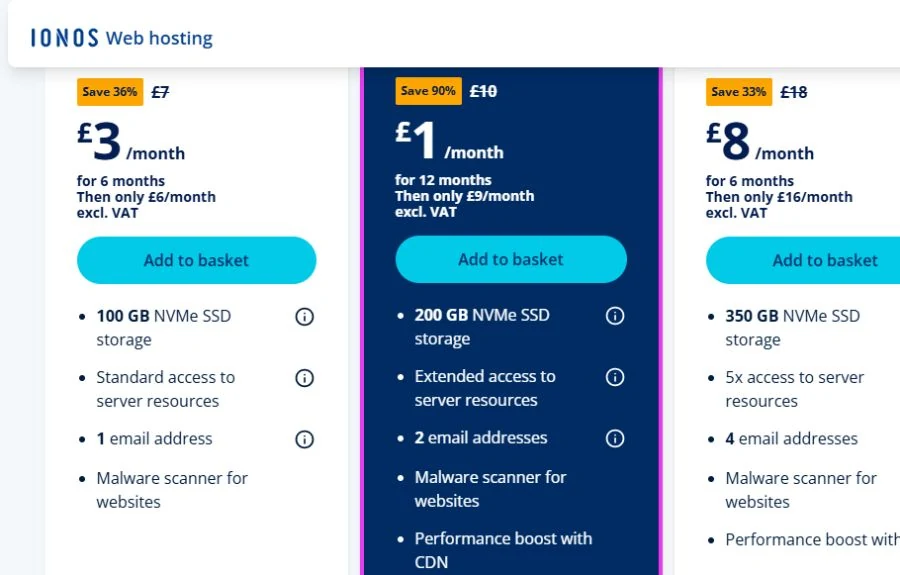
Starter cPanel lists five business-email addresses at £0.96/month. IONOS Standard lists one at £3/month for six months, then £6/month excluding VAT. The included-address allowance is five times as large; the listed initial monthly rate is 68.00% lower.
- IONOS Standard has 100GB NVMe storage versus telaHosting’s 10GB.
- IONOS Plus also advertises £1/month for 12 months with 200GB and two addresses. Standard is not IONOS’ lowest promotional price.
- The catalogue says Business Email: 5; do not expand this to five equivalent Microsoft-style user licences or assume mailbox capacity.
- The 68.00% uses listed charges; IONOS excludes VAT and telaHosting’s public VAT basis is unstated.

Published plans · 30 October 2026
A smaller standalone-email subscription than one office-suite licence
A sole trader or small organisation needing basic domain email rather than Microsoft’s wider productivity and collaboration suite.
telaMail 1 lists £0.80/month or £9.60/year. One Microsoft 365 Business Basic no-Teams licence lists £5.04/month, or £4.20/user/month paid yearly (£50.40/year). For a simple standalone-mail requirement, telaMail’s listed annual entry subscription is £40.80 lower, an 80.95% difference.
- Microsoft includes a wider productivity/cloud suite; paying for those functions may be appropriate when the team needs them.
- The telaMail Business Email: 10 allowance is not ten equivalent Microsoft user licences. Do not multiply the Microsoft price by ten as a savings claim.
- Treat the telaMail 5GB storage as plan-level unless a provider-confirmed per-mailbox allocation is available.
- Microsoft explicitly excludes VAT; telaHosting’s captured public projection does not state its VAT basis. The 80.95% compares listed annual subscription amounts.
Follow the subject
Your perspective
Join the discussion
Ask a question, share what worked, or add a useful detail.
Loading discussion…
Comment moderation
Only approved contributions appear in the discussion.