
In this article 12 sections
A reseller service begins with an upstream hosting allocation and ends with customers receiving the service you promised. Between those points are package limits, account creation, DNS, billing, support and renewal. Understanding the whole sequence helps prevent a dashboard action being mistaken for a complete customer service.
The details vary by provider and control panel. This guide uses a permitted cPanel and WHM arrangement as an example for UK businesses. Use the current documentation and privileges of your actual account rather than assuming every reseller can perform every server function.
1. Agree the upstream service
Identify the applications, resource needs, account count and support scope you require. Read the acceptable-use policy, backup terms and exit arrangements. Ask who deals with server faults, compromised accounts, restorations and unsupported client software.
Keep the agreement and business account under your control, with strong authentication and recoverable access. A reseller’s customers depend on that upstream relationship, so renewal and payment responsibilities should not rely on one person remembering a date.
2. Purchase an allocation with measurable limits
The plan may define storage, transfer policy and separate account capacity alongside other resource limits. Count website files, databases, mail and operational headroom. An account limit and a website limit describe different things; one account may permit multiple sites within the terms.
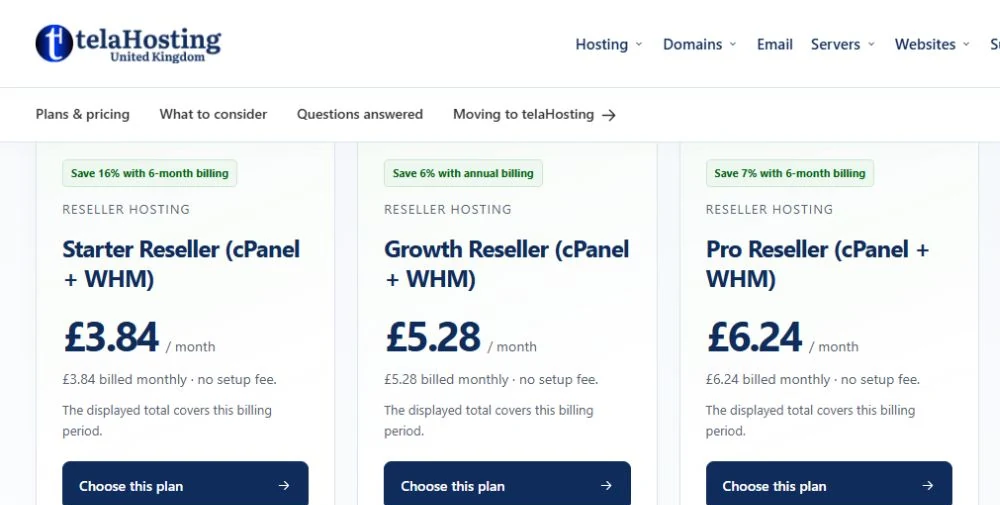
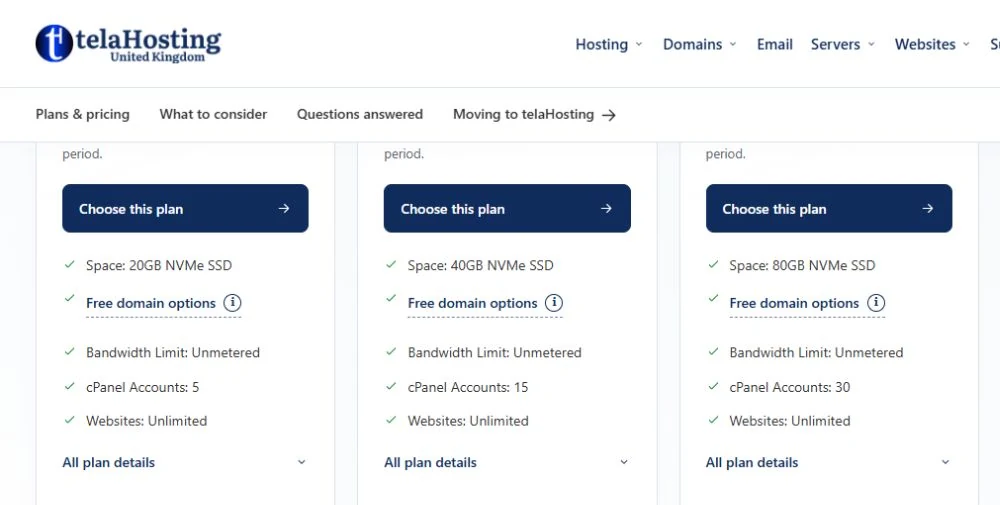
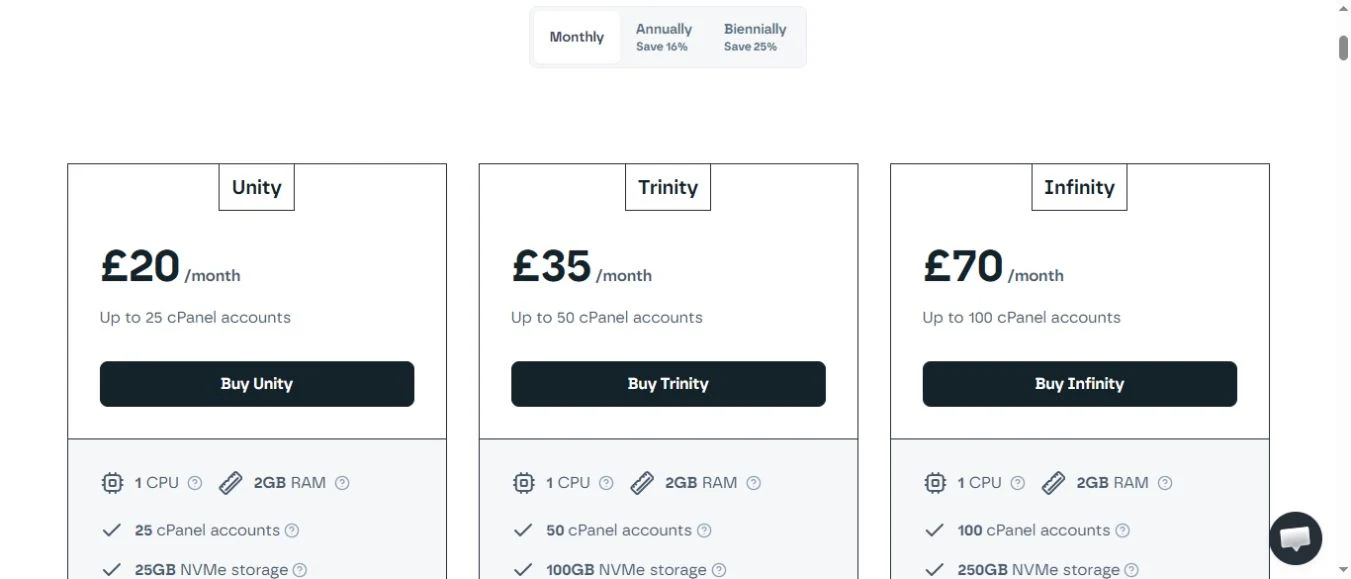
For a small start, telaHosting’s captured Starter Reseller allocation lists five cPanel accounts and 20GB NVMe at £3.84/month. Its smaller listed entry bill compared with Krystal Unity’s £20/month can suit a five-account requirement, while Unity includes twenty-five accounts, 25GB and daily offsite rather than weekly backups. The comparison is about entry budget, not equal bundles or tax-inclusive totals.
3. Understand WHM and cPanel
WHM offers the management functions granted to the reseller, such as creating owned accounts and applying packages. The provider controls reseller privileges. cPanel is the individual account interface for tasks such as websites, databases and mail within the permitted features.
Use separate customer accounts rather than giving every client the reseller login. That makes permissions, usage review and later handover easier to manage. Protect privileged access and avoid sharing passwords through ordinary email or support tickets.
Account creation also involves domain, DNS and mail-routing choices. If a customer uses external email, preserve the appropriate routing and records. Creating a local mailbox does not move an existing mail archive or automatically change an external service.
4. Define packages that match your service
A package is a reusable set of limits and enabled functions. Decide storage, transfer, mailbox and database allowances as appropriate to the plan. Use clear names that remain meaningful when prices change; keep the commercial price in the billing system rather than encoding it into an unstable technical label.
Do not promise clients more usable capacity than the allocation and resource policy support. Keep application care, development, migration and support scope explicit. A hosting package can include optional services, but each additional promise requires time and an operating process.
5. Apply branding accurately
White-label features may let you present a customer-facing identity, control-panel branding or private nameservers. Verify what the selected service actually supports. A private nameserver is a naming arrangement, not proof that you own the infrastructure.
Use real business details and appropriate supplier disclosures. Privacy information and processing contracts should reflect the actual chain. Avoid claiming a UK server location or direct infrastructure ownership without evidence. The business can add genuine value through its service without inventing its facilities.
6. Turn an order into a checked account
Collect only necessary customer and service details, present the contract clearly and verify payment through the provider’s intended process. Keep a unique order reference. Automated provisioning must handle duplicate notifications without creating duplicate accounts or charges.
Create the account with the correct package and domain, then verify website access, HTTPS, DNS and mail as relevant. Use secure onboarding and explain the customer’s responsibilities. A successful account-creation message does not prove the public domain resolves or that an enquiry form delivers mail.
For UK payments, compare the actual merchant fees, supported methods, refunds and reconciliation. An invoice paid by bank transfer and a card subscription have different confirmation and failure handling. Do not treat a pending state as cleared payment merely to make onboarding appear instant.
7. Operate the customer relationship
Provide the agreed support route and triage issues into infrastructure, account, application or third-party problems. Gather timestamps and symptoms without requesting passwords unnecessarily. Escalate an appropriate evidence summary to the upstream provider.
Maintain renewals, invoices, notices and an agreed process for unpaid or cancelled accounts. A billing tool can schedule actions, but the business must configure and review them. Destructive account termination needs particular care because it affects customer data and recovery.
Understand the financial model
Revenue comes from the services customers actually buy and continue to use. Deduct upstream charges and the rest of the operating costs, including software, payment fees, support, recovery storage and tax where applicable. A nominal margin before staff time is not automatically profit.
In a hypothetical five-client service at £12 per client each month, revenue is £60. If the upstream monthly charge is £3.84, £56.16 remains before all other costs. This illustration does not establish demand, workload or attainable earnings. Use your real package and support assumptions.
Check the data and recovery chain
Your roles for billing information may differ from roles for personal data hosted on a client’s website. Identify the actual controller and processor arrangements and the terms governing sub-processors. Record access, retention, incident contacts and international transfers where relevant.
Confirm what backups contain, their frequency and retention, and how a customer obtains a restoration. Keep suitable separation and test recovery. A client shop may have new orders after the last copy, so a restore decision needs application and business context.
Test a full lifecycle before adding many clients
Use an authorised test account to complete an order, provision the service, configure a domain, verify web and mail functions, request help and perform a controlled restore. Then test an upgrade, a failed payment and an exit without risking a real client’s data.
Document the steps and exceptions so another authorised person can operate them. Review usage and support load before the next expansion. Reseller hosting works well when repeatable account tools are joined to accurate promises and dependable customer handling.
Design the exception path as carefully as the normal path
A customer may pay after an invoice is marked overdue, a notification may arrive twice or a provisioned domain may already exist. Decide how staff identify the existing order and account before retrying. Keep unique references and record manual corrections so automation does not repeat them later.
Review scheduled suspension and termination settings with particular care. An unattended rule can affect customer data while a payment is being investigated. The agreement, notice process and applicable obligations should guide the action. A dashboard’s ability to delete an account does not make deletion the appropriate first response.
During a handover, give the next authorised operator enough information to understand pending exceptions, upcoming renewals and active incidents. Keep secrets separately protected. A repeatable reseller workflow includes both the successful account creation and the ordinary problems that occur afterwards. That operational detail makes growth easier to manage without leaving unresolved cases dependent on one person’s memory.
Published plans · 30 October 2026
80.80% lower listed monthly entry bill for a five-account reseller start
An agency beginning with up to five separate cPanel accounts, rather than needing a 25-account allocation immediately.
For an agency starting with up to five cPanel accounts, telaHosting Starter Reseller lists £3.84/month versus Krystal Unity’s £20/month entry plan. That is £16.16 less per listed month, or an 80.80% lower entry bill.
- Krystal includes 25 accounts versus five, 25GB versus 20GB, and daily offsite versus weekly listed backups.
- Do not describe an 80.80% reduction in cost per fully used account; this comparison is the plan entry bill.
- Krystal’s captured Include VAT control is unchecked and telaHosting’s VAT basis is unstated; final invoices are not equated.
Follow the subject
Your perspective
Join the discussion
Ask a question, share what worked, or add a useful detail.
Loading discussion…
Comment moderation
Only approved contributions appear in the discussion.